Cutting Pick Time by 23% in a 3PL Warehouse

From baseline bottlenecks to pilot results

A warehouse improvement case and a showcase of the shared slide system.

Introduction

Part I

Setting the frame and objectives

01

Today’s Agenda

Today’s Flow

  1. West Hub baseline performance
  2. Time-motion findings
  3. Intervention options
  4. Pilot design and outcomes
  5. Financial impact and risks
  6. Recommendation and rollout

Decision Needed

Approve an 8-week rollout across Zones A-C

  • Budget: $180k (software + training)
  • Expected payback: < 6 months

Key assumptions

  • 2 shifts, 180 pickers, 120k lines/day
  • Peak season +18% volume in Q4
  • Target: -20% travel time, +1.5% accuracy

Learning Objectives

By the end of this presentation, you will be able to:

  1. Diagnose the main drivers of pick time
  2. Quantify the impact of slotting and batching changes
  3. Interpret pilot KPIs (throughput, accuracy, rework)
  4. Decide the rollout plan and governance model

The Core Constraint

Travel time drives 62% of total pick cycle time.

The Hook: Why This Matters

What if we could ship 14,000 more orders per week without adding headcount?

About the Speaker

Portrait photo of the speaker.

FulfillCo Logistics - West Hub

Breno A. Beirigo

Director of Operations Analytics
FulfillCo Logistics

What I do

  • Optimize slotting, batching, and labor planning
  • Build decision-support tools for ops leaders
  • Lead pilots across 8 fulfillment centers

Why listen

  • 12 years in warehouse operations + analytics
  • Led 5 network-wide efficiency rollouts
  • Delivered $9.4M annualized savings in 2025

Stakeholder Goals

Operations

  • Reduce travel and congestion
  • Stabilize pick accuracy
  • Improve labor planning
  • Reduce training time

Finance and Customer Experience

  • Lower cost per order
  • Increase on-time shipment rate
  • Reduce rework and returns
  • Improve peak-season readiness

Branding & Identity

Program identity graphic.

FulfillCo Optimize 2026

Program goals

  • Standardize picking across zones
  • Deliver 20% faster cycle times
  • Reduce training ramp from 4 weeks to 2
  • Create a repeatable playbook for new sites

Core Slide Types

Part II

Layouts, purpose, and high-impact patterns

02

Baseline Performance - West Hub

West Hub ships ~24k orders/day across three zones. Current performance shows:

  • 6.8 min average pick cycle time (goal: 5.2)
  • 1.9% mis-pick rate (target: < 0.8%)
  • 7.4 km walked per picker per shift

Constraint

62% of cycle time is travel + search, not picking.

Root Causes We Can Fix

See Figure 1 for the typical pick flow diagram.

Root causes observed

  • Replenishments block main aisles at peak
  • Fast movers scattered across zones
  • Batch sizes inconsistent by shift

These issues create congestion and extra walking (see Figure 1)

Order released

Pick list generated and make someting with it

Travel to aisle

Pick and scan

Quality check

Pack & stage

Figure 1: Typical pick flow in West Hub before pilot.

The Three Levers (Slotting, Batching, Pathing)

Slotting

Move fast movers closer to pack

Top movers: A/B/C runners

Batching

Group orders by aisle affinity

Wave size: 12-16 orders

Pathing

Dynamic routes reduce cross-aisle trips

Rule: one-way aisles during peak

Pilot Result - Cycle Time

23%

Reduction in average pick cycle time after pilot

Measured across Zones A-C over 6 weeks

Executive Quote

Small changes in travel paths create big gains in throughput.

  • Priya Nair, VP Operations, FulfillCo

This is why we focused on travel distance before adding labor.

The Hidden Tax

Every extra step is a tax on throughput, accuracy, and morale.

Pilot Delivery Plan (8 Weeks)

See Figure 2 for the pilot delivery roadmap.

Week 1Data audit + travelheatmapWeek 2Slotting model +pick path rulesWeek 3Aisle changes +signageWeek 4Training + wavetuningWeek 5-6Pilot executionWeek 7KPI readoutWeek 8Rollout decisionPilot delivery roadmap
Figure 2: Pilot delivery roadmap

Prioritization - Effort vs Impact

See Figure 3 for the effort vs impact decision matrix.

Quick winsBig betsFill-insAvoidPick-to-lightOne-way aislesBatch 14-16Re-slot top 300LowHigh effortLowHigh impactEffort vs impact (West Hub)
Figure 3: Effort vs impact decision matrix

Visual Content

Part III

Figures, tables, and diagrams that teach

03

Baseline vs Pilot KPIs

Table 1: Baseline, target, and pilot KPIs
Metric Baseline Target Pilot
Orders per hour 420 520 515
Pick cycle time (min) 6.8 5.2 5.2
Mis-pick rate 1.9% 0.8% 0.7%
Travel per shift (km) 7.4 5.5 5.6

Throughput Trend - Orders per Hour

Line chart of throughput trend.

Readout

Throughput increased steadily after slotting changes in Week 3.

Where People Walk - Travel Heatmap
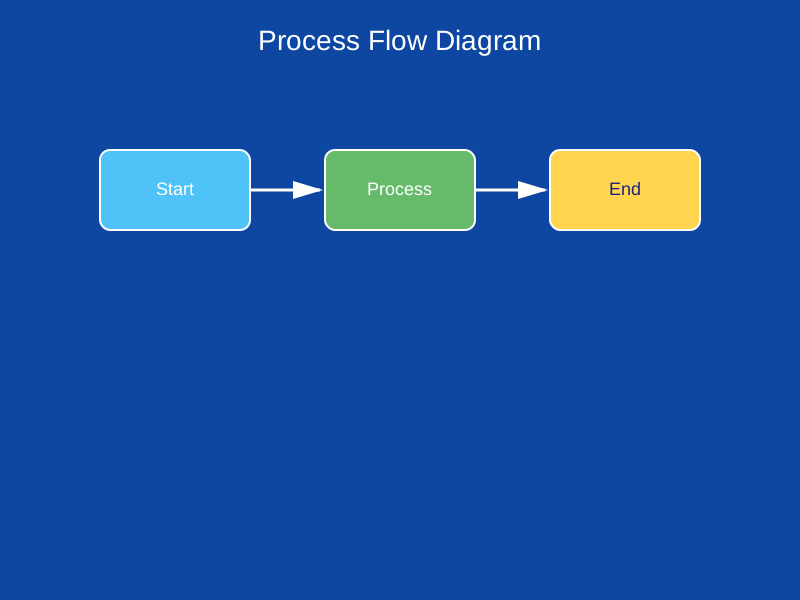
Warehouse heatmap diagram.

Hot spots cluster near Aisle 7 and the cross-dock lane.

Before/After - Travel Pattern

BEFORE: Unoptimized

AFTER: Slotted + Batched

Code & Technical Content

Part IV

Readable code, reproducible results

04

Inputs (Orders + Layout)

# Orders, distances, and aisle metadata
orders = load_orders("west_hub_orders.csv")
layout = load_layout("west_hub_layout.json")
travel_time = build_time_matrix(layout)

Heuristic (Nearest Neighbor + 2-Opt)

# Build initial tour
current = 0
route = [current]
visited = {current}

while len(visited) < len(orders):
    next_stop = min(
        (i for i in range(len(orders)) if i not in visited),
        key=lambda i: travel_time[current, i]
    )
    route.append(next_stop)
    visited.add(next_stop)
    current = next_stop

# Improve with 2-opt
route = two_opt(route, travel_time)

Code Animation: Line Highlight Steps

When to use

  • Walk through a function without reading it all at once
  • Keep attention on the “now” line(s)
  • Pair each click with one sentence of explanation {.fragment}

Tip

Syntax: add code-line-numbers="|1|3-6|8" to a code block.

def two_opt(route, dist):
    improved = True
    while improved:
        improved = False
        for i in range(1, len(route) - 2):
            for j in range(i + 2, len(route) - 1):
                delta = (
                    dist[route[i-1], route[j]]
                    + dist[route[i], route[j+1]]
                    - dist[route[i-1], route[i]]
                    - dist[route[j], route[j+1]]
                )
                if delta < -1e-10:
                    route[i:j+1] = reversed(route[i:j+1])
                    improved = True
                    break
            if improved:
                break
    return route

Code Animation: Auto-Animate (Build the Solution)

# Step 1: Build an initial route (fast, not optimal)
current = 0
route = [current]
visited = {current}

while len(visited) < len(orders):
    next_stop = min(
        (i for i in range(len(orders)) if i not in visited),
        key=lambda i: travel_time[current, i]
    )
    route.append(next_stop)
    visited.add(next_stop)
    current = next_stop

Code Animation: Auto-Animate (Build the Solution)

# Step 1: Build an initial route (fast, not optimal)
current = 0
route = [current]
visited = {current}

while len(visited) < len(orders):
    next_stop = min(
        (i for i in range(len(orders)) if i not in visited),
        key=lambda i: travel_time[current, i]
    )
    route.append(next_stop)
    visited.add(next_stop)
    current = next_stop

# Step 2: Improve it (small effort, big travel-time gain)
route = two_opt(route, travel_time)

Highlighted Code (Advanced)

def two_opt(route, dist):
    improved = True
    best = route
    while improved:
        improved = False
        for i in range(1, len(best) - 2):
            for j in range(i + 2, len(best) - 1):
                delta = (
                    dist[best[i-1], best[j]] + dist[best[i], best[j+1]] -
                    dist[best[i-1], best[i]] - dist[best[j], best[j+1]]
                )
                if delta < -1e-10:
                    best[i:j+1] = reversed(best[i:j+1])
                    improved = True
                    break
            if improved:
                break
    return best

Pilot Run Output (Terminal)

$ python run_pilot.py --zone A --weeks 6
Loaded 4,812 orders
Baseline avg cycle time: 6.8 min
Pilot avg cycle time: 5.2 min
Accuracy: 99.3%

Live Demo

Run a 50-order batch, show route overlay, then export KPIs.

Cycle Time Model (Simple)

The pick cycle time can be expressed as:

\[ T = T_{travel} + T_{search} + T_{pick} + T_{scan} \]

Where \(T_{travel}\) dominates during peak congestion.

Teaching Slides

Part V

Active learning and guided practice

05

Quick Check (Decision Question)

Question: Which action reduces travel time the most?

A. Add two scanners per aisle
B. Re-slot top 300 SKUs to fast aisles
C. Add one extra picker per shift
D. Increase pack station count

Exercise: Slotting Plan

Activity (10 minutes)

In teams of 3, map your zone’s top 20 SKUs to A/B/C slots.

Deliverable

  • Top 20 SKU list
  • Proposed A/B/C placement
  • One risk to address (space, replenishment, safety)

Timebox

  • 6 minutes work
  • 4 minutes share-out

Callouts in Action (Risk, Lever, Critical)

Risk: Aisle Congestion

Replenishments overlap with pick waves between 9-11 AM.

Best Lever: Re-slot Top 300 SKUs

Moves 41% of volume into 2 fast aisles.

Critical: Scanner Latency

2-3s delays add ~18 minutes per shift.

Common Mistakes

Mistake: Mixing A/B/C in one aisle

Creates cross-traffic and breaks batching logic.

Mistake: Untrained temps in fast aisles

Quality drops before cycle time improves.

Mistake: Ignoring replenishment windows

Re-slotting can backfire without timing controls.

Workflow Slides

Part VI

Breaks, Q&A, and audience flow

06

Parking Lot (Capture Questions)

Parking Lot

Questions we will return to later:

  • Should we standardize tote sizes before re-slotting?
  • What change-management approvals are required?
  • How will we measure pick accuracy during the pilot?

Switch to Demo

Live demo: running the heuristic and visualizing the tour

Plan

  • Run: python run_pilot.py --zone A
  • Show: output, runtime, and KPI export

Conclusion

Part VII

Synthesis and next steps

07

Summary of Findings

  1. Travel time is the dominant driver of pick cycle time
  2. Slotting + batching reduced cycle time by 23% in pilot
  3. Accuracy improved to 99.3% with revised training
  4. ROI < 6 months on a full rollout

Recommendation

Approve Rollout

Proceed with an 8-week rollout across Zones A-C, starting March 1.

Owner: Ops Excellence
Budget: $180k
Success metrics: -20% cycle time, >99% accuracy

References

Media & Engagement

Part VIII

Video, imagery, and social proof

08

Social Proof (Operations Quote + Metrics)

“The new slotting rules cut training time in half. New hires hit target pace by day 10.”

  • Maria Lopez, West Hub Operations Lead

Pilot KPIs

Training ramp: 4 weeks -> 2 weeks : 98.1% -> 99.3%

Signals of adoption

  • 82% of pickers prefer new route guidance
  • 3 supervisors requested the playbook for other sites
  • Replenishments rescheduled to avoid peak congestion

Social Media Integration

Why include social proof?

  • Demonstrates adoption
  • Shows stakeholder buy-in
  • Signals momentum
  • Reinforces credibility

Quote

“Pilot results changed how we schedule labor.”

Sarah Johnson, DC Manager

The slotting changes reduced congestion immediately. Pickers report less backtracking and faster training.

Pilot Walkthrough

Customer Voice

“Orders ship earlier now, and we see fewer partials at the docks.”

  • Regional Carrier Partner

Appendix

Appendix

Risks, rollout plan, and operating model

A

Risk Register

Table 2: Risk register with mitigations
Risk Impact Likelihood Mitigation
Poor data quality High Medium Data audit + validation checks
Overfitting to benchmarks Medium Medium Holdout instances + ablations
Low adoption High Low Pilot, training, human-in-the-loop

Rollout Phases

See Figure 4 for the implementation plan diagram.

Phase 1: Baseline

Phase 2: Prototype

Phase 3: Pilot

Phase 4: Rollout

Figure 4: Implementation plan in four phases

Method Walkthrough

Part IX

Step-by-step method walkthrough

09

The method: Large Neighborhood Search (LNS)

The method comprises 5 steps:

  • Step 1: Define the problem
  • Step 2: Define a neighborhood move
  • Step 3: Evaluate the move efficiently
  • Step 4: Acceptance rule
  • Step 5: Stopping conditions

Step 1: Define the problem

We solve a routing problem with constraints:

  • Each order is picked once
  • Travel time is minimized
  • Aisle rules (one-way) are respected

Feasible Solution

Meets capacity, time windows, and route length limits.

Step 2: Define a neighborhood move

Common moves:

  • 2-opt (reverse a segment)
  • relocate (move one node)
  • swap (exchange two nodes)

Step 3: Evaluate the move efficiently

Instead of recomputing the full tour cost, use a delta evaluation:

\[ \Delta = (c_{a,c} + c_{b,d}) - (c_{a,b} + c_{c,d}) \]

Step 4: Acceptance rule

  • Greedy: accept if \(\Delta < 0\)
  • Threshold: accept if \(\Delta < \tau\)
  • Probabilistic: accept sometimes even if \(\Delta > 0\)

Step 5: Stopping conditions

Stop when:

  • no improving move exists
  • time limit reached
  • max iterations reached
  • stagnation threshold reached

Practical default

Always enforce a hard time limit for reproducibility and fairness.

Layout Components

Part X

Reusable layout building blocks

10

West Hub Snapshot

West Hub

  • 3 zones
  • 180 pickers
  • 24k orders/day

Why this site?

  • Highest congestion in the network
  • Most variable cycle time
  • Best data coverage for pilot

We chose West Hub because changes here generalize to other sites.

Rollout Workstreams (2x2)

Baseline

Baseline

  • Time study
  • Heatmap
  • KPI audit

Interventions

Interventions

  • Slotting
  • Batching
  • Pathing

Pilot

Improvement

  • Local search
  • Delta evaluation
  • Stopping rules

Rollout

Deployment

  • Pilot
  • Monitoring
  • Adoption plan

Operating Model Checklist (3x2)

People

Roles and ownership

Process

Routines and SOPs

Data

Inputs and quality

Model

Optimization logic

Tech

Tooling and uptime

Change

Training and adoption

Chart Visualization

Part XI

Common questions → charts that answer them

11

Chart Visualization: Common Themes That Carry Meaning

Use the question to pick the chart. Most stakeholder asks fit one of these:

  • Change over time → line chart (annotate events; show baseline vs after)
  • Compare categories → sorted dot/bar (common scale; label values)
  • Show distribution → histogram/box (show variability + outliers)
  • Show relationships → scatter + trend (avoid overplotting; show uncertainty)
  • Show composition → 100% stacked bars or small multiples (avoid pies)
  • Show intensity in a matrix/space → heatmap (use perceptual color scales)

Design Rules of Thumb

  • Prefer position/length encodings; use color for emphasis, not precision.
  • Direct-label key series/categories; keep legends secondary.
  • Remove non-essential ink; keep one clear takeaway per slide.

Change Over Time: Annotate the Moment the Story Changes
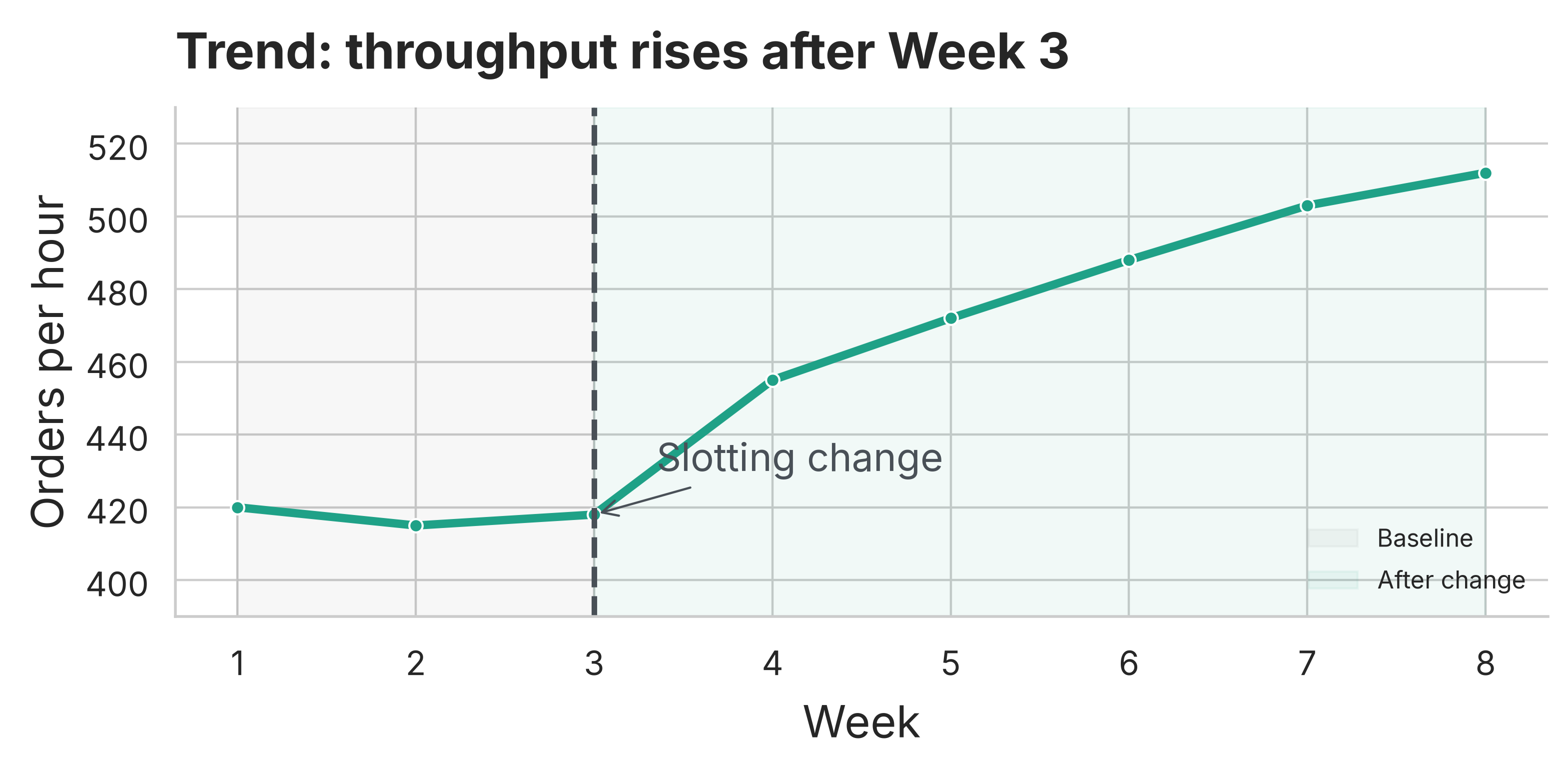
Figure 5: Orders per hour over eight weeks, with the intervention annotated.

Readout

The slope and the step-change matter more than week-to-week noise — annotate the intervention.

Compare Categories: Sort + Use a Common Baseline
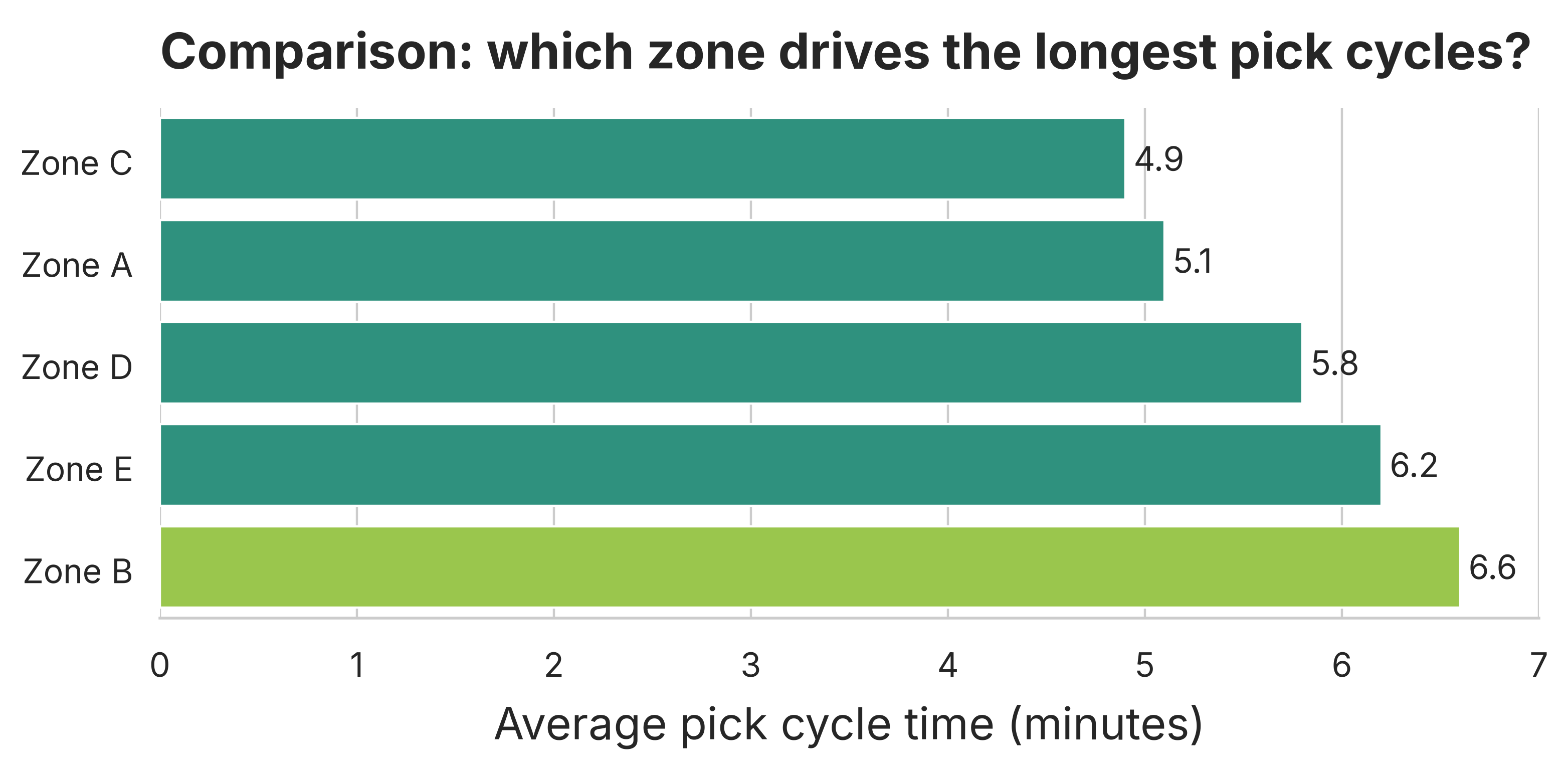
Figure 6: Average pick cycle time by zone (sorted).

Readout

Sorting makes rank obvious; highlight only the category you want the room to discuss.

Distribution: Show Spread, Not Just the Average
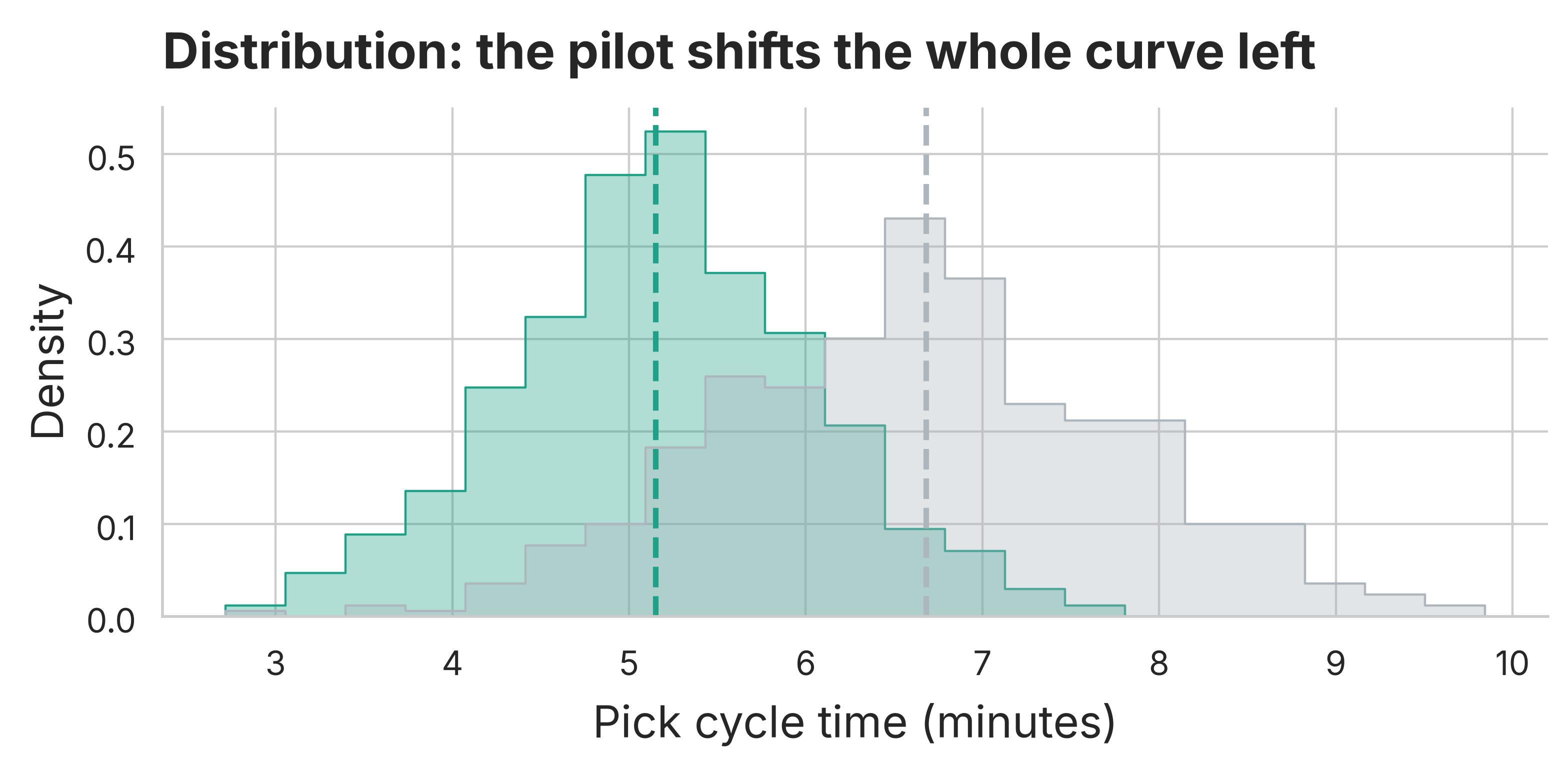
Figure 7: Pick cycle time distribution (baseline vs pilot).

Readout

Medians can improve while the tail stays risky — distributions reveal where the pain remains.

Relationship: Use Scatter + Trend to Explain Drivers
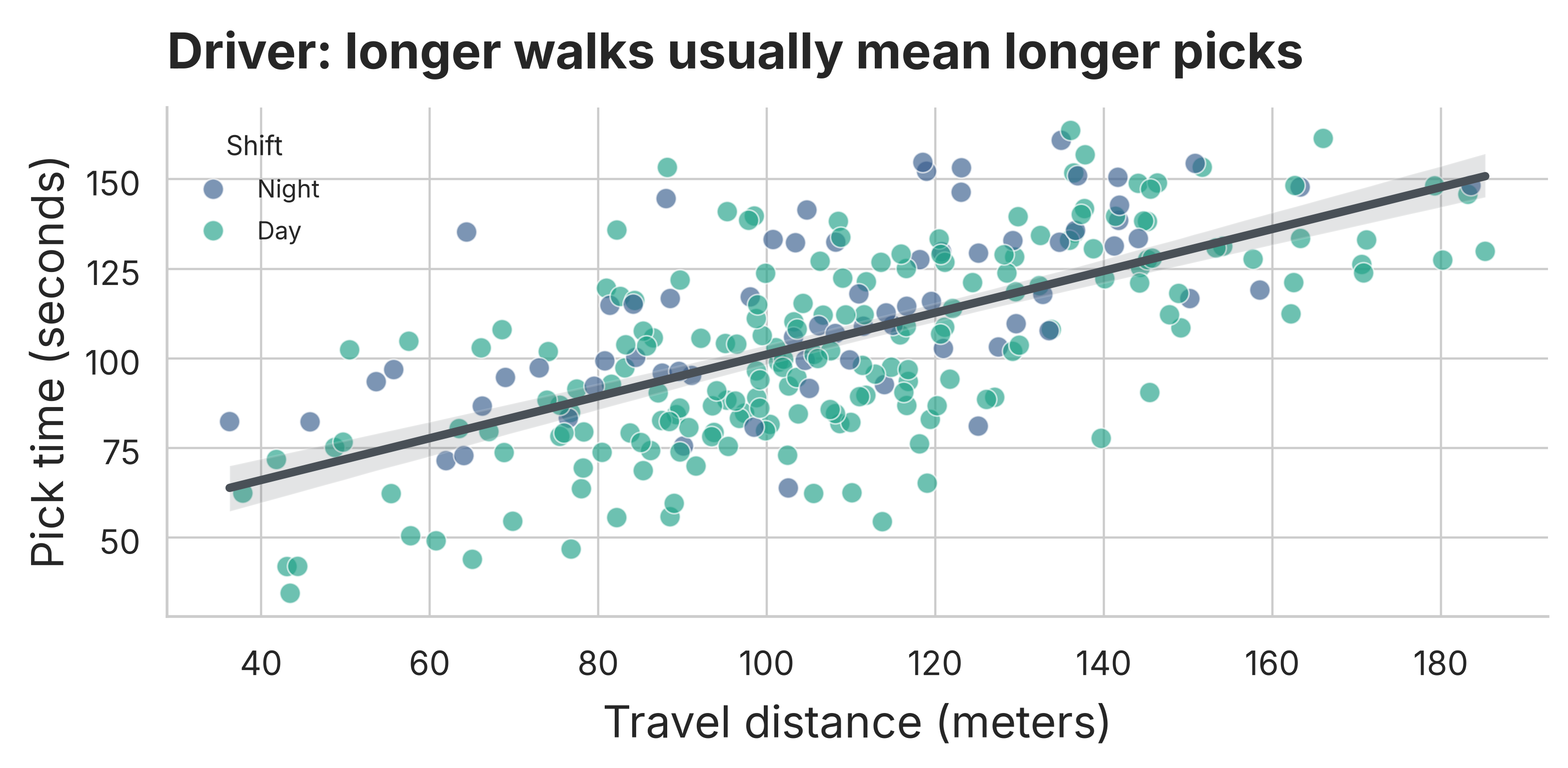
Figure 8: Travel distance vs pick time with an overall trend.

Readout

When you argue about drivers, show the raw points and the trend — not just a correlation coefficient.

Composition: Check Mix Before Comparing Performance
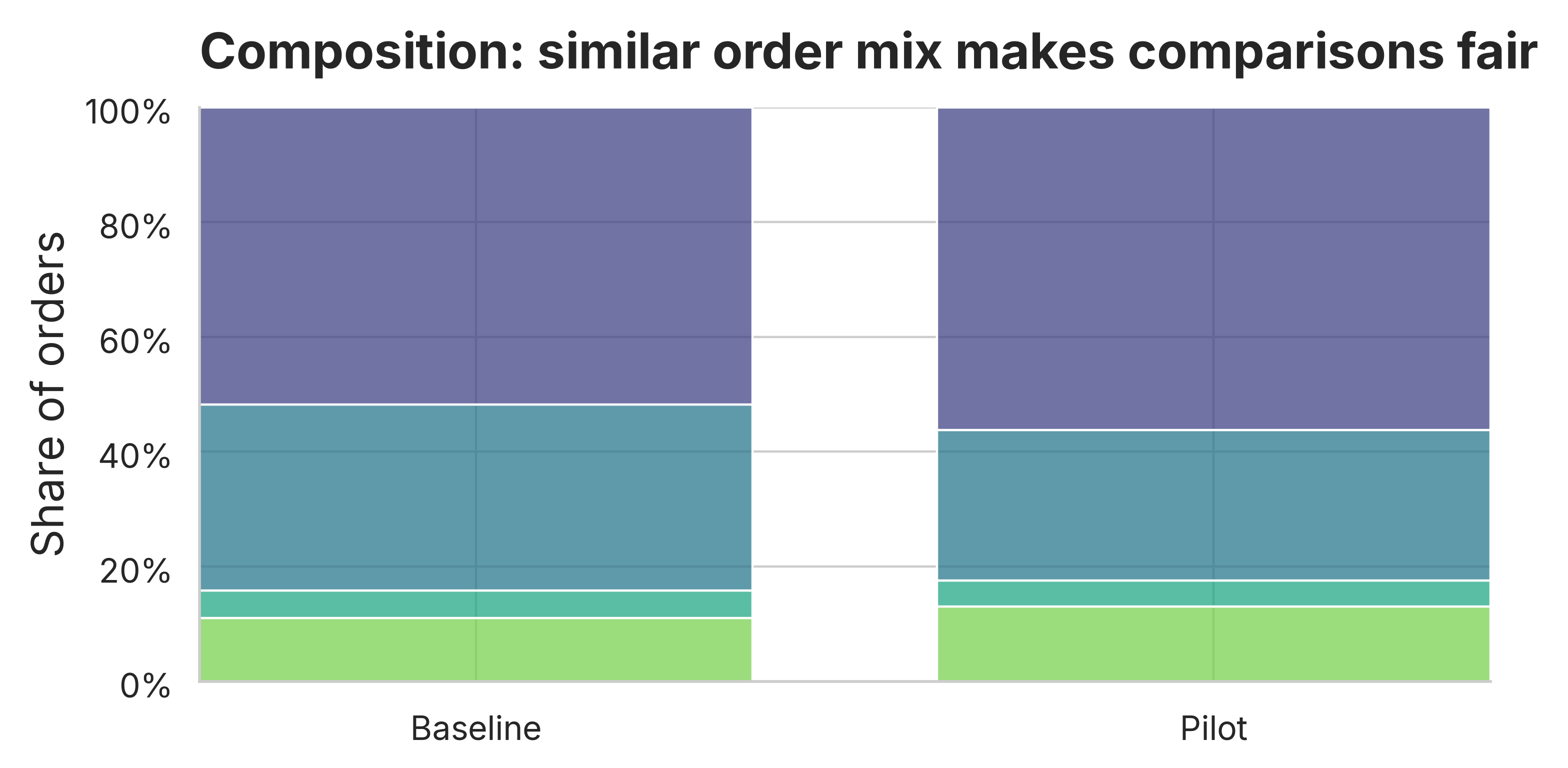
Figure 9: Order mix (100% stacked) for baseline vs pilot.

Readout

If the mix changes, KPI changes may be case-mix, not process improvement.

Heatmaps: Use Color for Patterns, Not Precise Values
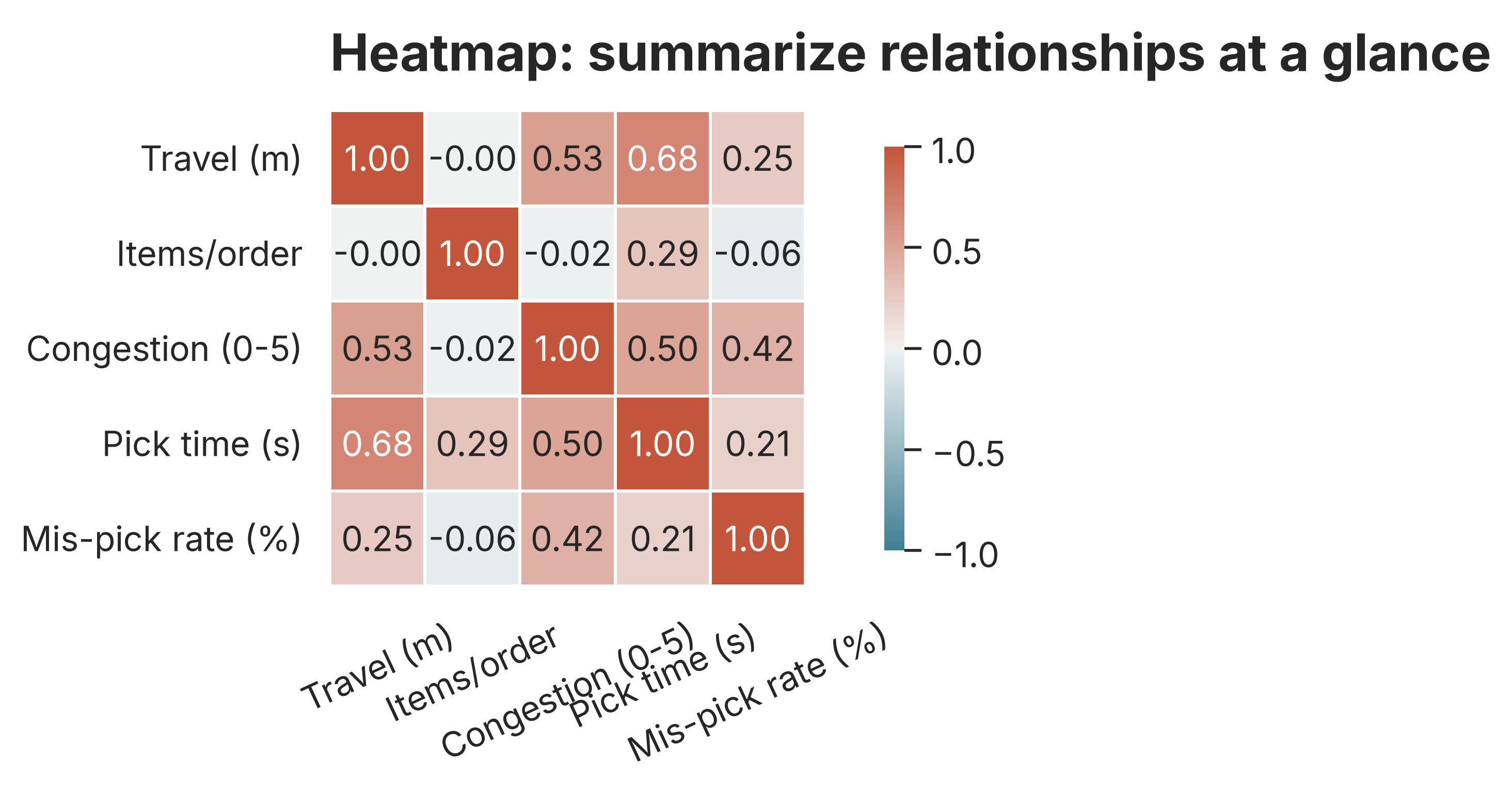
Figure 10: Correlation heatmap across operational metrics (illustrative).

Readout

Heatmaps are for pattern recognition — use them to find questions, then follow up with detailed charts.