Normal print:
[[1, 2, 3, 4], [5, 6, 7, 8], [9, 10, 11, 12], [13, 14, 15, 16], [17, 18, 19, 20], [21, 22, 23, 24], [25, 26, 27, 28], [29, 30, 31, 32], [33, 34, 35, 36], [37, 38, 39, 40]]
Pretty print:
[[1, 2, 3, 4],
[5, 6, 7, 8],
[9, 10, 11, 12],
[13, 14, 15, 16],
[17, 18, 19, 20],
[21, 22, 23, 24],
[25, 26, 27, 28],
[29, 30, 31, 32],
[33, 34, 35, 36],
[37, 38, 39, 40]]7.1 Data structures and performance
A data structure is a method of organizing and storing data in a computer so that it can be accessed and manipulated efficiently. They provide a level of abstraction, allowing programmers to manage data without needing to worry about the low-level implementation details.
Choosing the appropriate data structure is essential because different structures offer varying performance in terms of memory usage, speed, and ease of use. For example, suppose you are storing a list of customer orders, each containing specific details. If you have n orders, consider the following factors:
- Access. How quickly can you find a specific order?
- Memory. How much memory is required to store all the orders?
- Insertion and deletion. How easy is it to add or remove an order?
The complexity of these operations will depend on the data structure you choose. Different data structures are optimized for specific tasks and involve trade-offs, making it critical to match the structure to the needs of the operations you intend to perform.
7.1.1 Operation costs and runtime growth
TipBig-O notation
To compare the performance of different data structures, computer scientists use Big-O notation. It gives an upper bound on how an algorithm's work or storage grows as the input size increases, ignoring constant factors. The input size is often written as \(n\). A constant bound is written \(O(1)\), a linear bound \(O(n)\), and a quadratic bound \(O(n^2)\). These bounds describe growth rather than elapsed seconds on a particular computer. Further examples appear in the Big-O Cheat Sheet.
Table 1 compares the work needed for common operations as the amount of data increases. The last column explains each pattern.
| Operation | Work as the input grows | Reason |
|---|---|---|
Read values[index] from a list of length \(n\) |
\(O(1)\) | The index selects one stored reference. |
| Search for a value in a list of length \(n\) | \(O(n)\) | An unsuccessful search can examine all \(n\) values. |
| Read a dictionary value by its key | Expected \(O(1)\) | A hash identifies a candidate location; collisions can require more work. |
| Visit all \(n\) values in a vector | \(O(n)\) | Each value is visited once. |
| Visit an \(r\) by \(c\) matrix | \(O(rc)\) | Each of its \(rc\) entries is visited once. |
| Make a shallow copy of a list of length \(n\) | \(O(n)\) | A new outer list receives \(n\) references. |
The grade-vector loop in Listing 12 performs one addition for each selected grade. Doubling the selected count doubles that count of additions.
The nested loops in Listing 21 visit 12 entries in a 3 by 4 matrix. Doubling both dimensions gives 48 visits. For a square matrix with \(n\) rows and \(n\) columns, the visit count is \(n^2\).
Counting operations explains growth; actual runtime also includes printing, allocation, and interpreter overhead.
Memory grows with the stored references and values. Table 4 later calculates storage for typed numerical elements. A Python list also needs a container and references to its elements, so its memory cannot be estimated by multiplying its length by the size of one numerical value.
The released Lists, Tuples, Sets, and Dictionaries lessons provide the prerequisites for the remaining material below.
7.1.2 Type hints
When you define functions involving data structures, it is helpful to use type hints to specify the expected types of the input arguments and return values. Type hints provide additional information about the function's parameters and return values, making the code more readable and easier to understand.
In Table 2, we provide examples of using type hints for functions that work with lists, tuples, sets, and dictionaries.
| Function Signature | Description |
|---|---|
def sum_list(lst: list[int]) -> int: |
Function that takes a list of integers as input and returns the sum of the elements. |
def sum_list(lst: list[int | float]) -> int | float: |
Function that takes a list of integers or floats as input and returns the sum of the elements. |
def get_tuple_length(tpl: tuple[str, int]) -> int: |
Function that takes a tuple of a string and an integer as input and returns the length of the tuple. |
def get_set_size(s: set[str]) -> int: |
Function that takes a set of strings as input and returns the size of the set. |
def get_dict_value(d: dict[str, int], key: str) -> int: |
Function that takes a dictionary of strings to integers and a key as input and returns the value associated with the key. |
def get_dict_keys(d: dict[str, int]) -> list[str]: |
Function that takes a dictionary of strings to integers as input and returns a list of keys. |
def find_reachable_cities(distances: dict[str, dict[str, float]]) -> dict[str, set]: |
Function that takes a dictionary of city distances and returns a dictionary of reachable cities for each city. |
7.1.3 pprint module
The pprint module in Python provides a way to pretty-print data structures, making them more readable and easier to understand. It is particularly useful when working with complex data structures like dictionaries and lists.
To use the pprint module, you need to import it into your Python script. The pprint module provides the pprint function, which formats the data structure in a more human-readable way.
In Listing 1, we have an example of pretty-printing a dictionary using the pprint module.
pprint module.
Normal print:
{'name': 'John Doe', 'age': 30, 'email': 'j.doe@gmail.com', 'phone': '123-456-7890', 'address': {'street': '123 Main St', 'city': 'New York', 'zip': '10001'}}
Pretty print:
{'address': {'city': 'New York', 'street': '123 Main St', 'zip': '10001'},
 'age': 30,
 'email': 'j.doe@gmail.com',
 'name': 'John Doe',
 'phone': '123-456-7890'}
Listing 2 applies the same formatting to a ten-row nested list.
pprint module.
7.1.4 Deep and shallow copies
When working with nested data structures like lists of lists or dictionaries of dictionaries, you may encounter situations where you need to create a copy of the data structure. Python provides two types of copying mechanisms: deep copy and shallow copy. In Table 3, we compare deep copy and shallow copy based on several criteria.
An alias is another name for the same object. Assignment such as data_alias = data creates an alias.
A mutation changes an existing mutable object, such as assigning a new value to a list element. All aliases refer to that changed object. The copy module documentation explains assignment and copying.
| Criteria | Deep copy | Shallow copy |
|---|---|---|
| Copy behavior | Creates a new outer container and recursively copies the nested mutable containers in these examples. Changes to those original containers do not affect the copied containers. | Creates a new outer container and retains references to nested objects. Changes to shared nested mutable objects are visible through both containers. |
| Memory use | Adds storage for the new outer container and copied nested mutable containers. | Adds storage for the outer container and its references; nested objects remain shared. |
| Performance | Traverses the outer container and reachable nested structure. Work depends on the complete structure being copied. | Copies the outer container's entries. A list with \(n\) entries requires \(O(n)\) work. |
| Use case | Use when you need to create an independent copy of the data structure. | Use when you want to create a shallow copy of the data structure and do not need to isolate changes between the original and copied data structures. |
Immutable values, such as the integers in the examples, can remain shared after a deep copy. More nested data can require more copying work even when the outer list has the same length. Custom object types can define their own copy behavior.
Shallow copy
A shallow copy creates a new object but does not create copies of nested objects. Instead, it copies references to the nested objects. As a result, changes made to the nested objects in the original data structure are reflected in the copied data structure and vice versa.
In Listing 3, we have an example of creating a shallow copy of a list of lists. Note that modifying the nested list in the original data structure reflects the changes in the copied data structure. This is a side effect of shallow copying, where changes to the nested objects are not isolated between the original and copied data structures.
import copy

# Create a list of lists
data_original = [
    [1, 2, 3], # Nested list 1
    [4, 5, 6], # Nested list 2
    [7, 8, 9], # Nested list 3
]

# Create a shallow copy of the list of lists
data_copy = copy.copy(data_original)

# Modify the nested list in the original
# data structure
data_original[0][0] = 100

# Modify the nested list in the copied
# data structure
data_copy[0][1] = 200

# Delete the second list in the original
# data structure
del data_original[1]

# Delete the third list in the copied
# data structure
del data_copy[2]

# Adding a new list to the original data structure
data_original.append(["O", "O", "O"])

# Adding a new list to the copied data structure
data_copy.append(["C", "C", "C"])

print(f"Original data:\n{data_original}")
print(f"Shallow copy:\n{data_copy}")
Original data:
[[100, 200, 3], [7, 8, 9], ['O', 'O', 'O']]
Shallow copy:
[[100, 200, 3], [4, 5, 6], ['C', 'C', 'C']]# Create a list of lists
data_original = [
[1, 2, 3], # Nested list 1
[4, 5, 6], # Nested list 2
[7, 8, 9], # Nested list 3
]
# Create a shallow copy of the list of lists
# using the list constructor
data_copy = list(data_original)
# Modify the nested list in the original
# data structure
data_original[0][0] = 100
# Modify the nested list in the copied
# data structure
data_copy[0][1] = 200
# Delete the second list in the original
# data structure
del data_original[1]
# Delete the third list in the copied
# data structure
del data_copy[2]
# Adding a new list to the original data structure
data_original.append(["O", "O", "O"])
# Adding a new list to the copied data structure
data_copy.append(["C", "C", "C"])
print(f"Original data:\n{data_original}")
print(f"Shallow copy:\n{data_copy}")Original data:
[[100, 200, 3], [7, 8, 9], ['O', 'O', 'O']]
Shallow copy:
[[100, 200, 3], [4, 5, 6], ['C', 'C', 'C']]The behavior of shallow copying is similar for dictionaries (or other mutable objects) with nested dictionaries. Listing 4 shows an example of creating a shallow copy of a dictionary of dictionaries.
The dictionary stores data about street networks. The first key represents the starting node id, the second key represents the ending node id, and the values are attributes of the street. A "node" is a point where two or more streets intersect.
Notice that:
- Changes in edge
1-2in the original data structure are reflected in the copied data structure, and vice versa. - The new edge
3-5added to the original data structure is also present in the copied data structure. - Removing node
2from the copied data structure does not affect the original data structure. This is because we are only removing the reference to the nested dictionary, not the nested dictionary itself.
dict constructor (the same behavior is expected if you use the copy module such as copy.copy(data_original)). The data structure represents a street network with attributes for each street segment. For example, the street segment between nodes 1 and 2 has a street name of "123 Main St," a maximum speed of 60 km/h, and a length of 100 meters.
import pprint

# Create a dictionary of dictionaries
data_original = {
    1: {2: {
        "street": "123 Main St",
        "max_speed_km_h": 60,
        "length_meters": 100,
    }},
    2: {3: {
        "street": "456 Elm St",
        "max_speed_km_h": 50,
        "length_meters": 200,
    }},
    3: {4: {
        "street": "789 Oak St",
        "max_speed_km_h": 40,
        "length_meters": 300,
    }}
}

# Create a shallow copy of the dictionary of dictionaries
data_copy = dict(data_original)

# Modify the nested dictionary in the original
# data structure
data_original[1][2]["max_speed_km_h"] = 70

# Modify the nested dictionary in the copied
# data structure
data_copy[1][2]["length_meters"] = 1000

# Add a new street segment from node 3 to node 5
# to the original data structure
data_original[3][5] = {
    "street": "ABC Pine St",
    "max_speed_km_h": 30,
    "length_meters": 400,
}

# Remove the street node 2 data from the copied
del data_copy[2]

print("Original data:")
pprint.pprint(data_original)
print("Shallow copy:")
pprint.pprint(data_copy)
Original data:
{1: {2: {'length_meters': 1000, 'max_speed_km_h': 70, 'street': '123 Main St'}},
2: {3: {'length_meters': 200, 'max_speed_km_h': 50, 'street': '456 Elm St'}},
3: {4: {'length_meters': 300, 'max_speed_km_h': 40, 'street': '789 Oak St'},
5: {'length_meters': 400, 'max_speed_km_h': 30, 'street': 'ABC Pine St'}}}
Shallow copy:
{1: {2: {'length_meters': 1000, 'max_speed_km_h': 70, 'street': '123 Main St'}},
3: {4: {'length_meters': 300, 'max_speed_km_h': 40, 'street': '789 Oak St'},
5: {'length_meters': 400, 'max_speed_km_h': 30, 'street': 'ABC Pine St'}}}7.1.5 Comparing data structures
When comparing data structures such as lists, tuples, dictionaries, or sets in Python, you can use the == operator to check if the data structures are equal (element-wise comparison).
To determine if two data structures are identical (i.e., they refer to the same object in memory), you have to use the is operator. Conversely, use is not to check if two data structures are different objects in memory. Listing 5 shows an example of comparing nested lists using the == and is operators.
Notice that the objects data, data_shallow, and data_deep are different objects in memory, as shown by the is operator. However, the nested lists nested1 and nested2 are the same objects in memory for the shallow copy data_shallow, while they are different objects in memory for the deep copy data_deep.
The assignment to data_alias keeps the same outer list. The first comparisons show equal values in three separate outer lists.
After nested1[0] = 100, the alias and shallow copy expose the changed row, while the deep copy keeps [1, 2]. Equality can therefore change after mutation; object identity stays the same.
The Python comparison reference defines value and identity comparisons.
== and is operators. The == operator checks if the data structures are equal (element-wise comparison), while the is operator checks if the data structures are identical (i.e., they refer to the same object in memory).
import copy

# Create data structures
nested1 = [1,2]
nested2 = [3,4]
data = [nested1, nested2]
data_alias = data

# Shallow copy of data
data_shallow = copy.copy(data)

# Deep copy of data
data_deep = copy.deepcopy(data)

# Compare data structures
print(f"data == data_shallow: {data == data_shallow}")
print(f"data == data_deep: {data == data_deep}")

# Compare identity
print(f"data is data_alias: {data is data_alias}")
print(f"data is data_shallow: {data is data_shallow}")
print(f"data is data_deep: {data is data_deep}")

# Compare identity of nested lists
print(f"nested1 is data_shallow[0]: {nested1 is data_shallow[0]}")
print(f"nested2 is data_shallow[1]: {nested2 is data_shallow[1]}")
print(f"nested1 is data_deep[0]: {nested1 is data_deep[0]}")
print(f"nested2 is data_deep[1]: {nested2 is data_deep[1]}")

row_before = data_deep[0][:]
nested1[0] = 100
print("After mutation, original:", data)
print("After mutation, alias:", data_alias)
print("After mutation, shallow copy:", data_shallow)
print("After mutation, deep copy:", data_deep)
print("Equal after mutation:", data == data_deep)


def test_copy_behavior():
    assert data_alias is data, "Assignment keeps the same outer list"
    assert data_shallow is not data, "A shallow copy has a new outer list"
    assert data_shallow[0] is nested1, "The shallow copy shares its row"
    assert data_deep[0] is not nested1, "The deep copy has a separate row"
    assert data_deep[0] == row_before == [1, 2], "Its old values remain"
    assert data == data_shallow, "Shared mutation keeps these lists equal"
    assert data != data_deep, "The independent row retains different values"


test_copy_behavior()
data == data_shallow: True
data == data_deep: True
data is data_alias: True
data is data_shallow: False
data is data_deep: False
nested1 is data_shallow[0]: True
nested2 is data_shallow[1]: True
nested1 is data_deep[0]: False
nested2 is data_deep[1]: False
After mutation, original: [[100, 2], [3, 4]]
After mutation, alias: [[100, 2], [3, 4]]
After mutation, shallow copy: [[100, 2], [3, 4]]
After mutation, deep copy: [[1, 2], [3, 4]]
Equal after mutation: False7.1.6 Filter, map, and reduce (advanced topic)
In functional programming, filter, map, and reduce are higher-order functions that operate on lists or other iterable objects. These functions allow you to perform common data processing tasks, such as filtering elements, applying a function to each element, and aggregating elements.
The examples use the lambda keyword. A lambda function is an anonymous function that can have any number of arguments but can only have one expression. It is commonly used in functional programming to define small, throwaway functions.
These functions could be rewritten using a regular function definition, but the lambda syntax is more concise and is often used for short, simple functions. In Listing 7, Listing 9, and Listing 11, we have examples of rewriting the previous examples using regular function definitions.
Filter
filter(function, iterable): The filter function applies a function to each element in the iterable and returns an iterator containing the elements for which the function returns True. In Listing 6, we have an example of using the filter function to filter even numbers from a list.
filter function.
Listing 7 uses a regular function definition for the same operation.
Map
map(function, iterable): The map function applies a function to each element in the iterable and returns an iterator containing the results. In Listing 8, we have an example of using the map function to square each element in a list.
x ** 2 to each element x in the list numbers using the map function.
Listing 9 uses a regular function definition for the same operation.
Reduce
reduce(function, iterable): The reduce function applies a function to the elements of the iterable cumulatively and returns a single value. In Python 3, the reduce function is available in the functools module. In Listing 10, we have an example of using the reduce function to calculate the sum of elements in a list.
reduce function.
Listing 11 uses a regular function definition for the same operation.
7.1.7 Working with vectors and tables
A list can represent a numerical vector. Its starting length and initial values must be chosen explicitly, and its length can change during execution. Indexing and slicing are described in the Lists chapter. The Loops chapter explains calculating a count, sum, and average. The examples below apply those ideas to vectors, matrices, images, and tabular files.
Passing and returning vectors
In Listing 12, five grades, 10, 20, 30, 40, and 50, have an average of 30. Passing a vector keeps the function's number of arguments fixed when the number of grades changes. Here, n selects the first n grades and must be between 1 and the vector's length. The printed trace shows each zero-based index and the running sum.
def avg_grades_individual_variables(
    grade_student1: float,
    grade_student2: float,
    grade_student3: float,
    grade_student4: float,
    grade_student5: float,
) -> float:
    return (
        grade_student1 + grade_student2 + grade_student3
        + grade_student4 + grade_student5
    ) / 5


def avg_of_grades_array(grades: list[int | float], n: int) -> float:
    if not 1 <= n <= len(grades):
        raise ValueError("n must select at least one available grade")
    total = 0.0
    for index in range(n):
        total += grades[index]
        print(f"Index: {index} = {grades[index]} - sum: {total}")
    return total / n


grades = [10, 20, 30, 40, 50]
assert avg_grades_individual_variables(10, 20, 30, 40, 50) == 30
assert avg_of_grades_array(grades, 5) == 30
print("Number of elements:", len(grades))
Index: 0 = 10 - sum: 10.0
Index: 1 = 20 - sum: 30.0
Index: 2 = 30 - sum: 60.0
Index: 3 = 40 - sum: 100.0
Index: 4 = 50 - sum: 150.0
Number of elements: 5Listing 13 creates five vectors with four elements each. None is an explicit placeholder. Type hints describe intended types; they do not automatically initialize elements or enforce their types. Summing a numerical vector works with integers or floating-point numbers.
integers: list[int] = [0] * 4
floating_point: list[float] = [0.0] * 4
strings: list[str] = [""] * 4
booleans: list[bool] = [False] * 4
placeholders: list[object] = [None] * 4

for values in (integers, floating_point, strings, booleans, placeholders):
    print(values[0])

integer_values = [0] * 3
integer_values[0] = 2
assert sum(integer_values) == 2
assert sum([1.1, 2.3, 3.1]) == 6.5
assert sum([1, 2, 3]) == 6
0
0.0
False
NoneListing 14 returns the multiples \(n \times 1\) through \(n \times 10\). For an argument of 3, the first, second, and fifth elements are 3, 6, and 15. Their Python indices are 0, 1, and 4.
[3, 6, 9, 12, 15, 18, 21, 24, 27, 30]Matrices and RGB images
A nested list can represent a matrix: the first index selects a row and the second selects a column. The multidimensional lists section introduces this indexing. Each row should be created separately when it must be independently editable.
Listing 15 starts with three rows and four columns of zeros. Four assignments produce the matrix below. The entry in row 1, column 0 is 30.
\[ \begin{bmatrix} 10 & 20 & 0 & 0 \\ 30 & 40 & 0 & 0 \\ 0 & 0 & 0 & 0 \end{bmatrix} \]
In Listing 16, a third index selects a color channel: 0 for red, 1 for green, and 2 for blue. Each channel value is an integer from 0 to 255. Black is [0, 0, 0], and white is [255, 255, 255]. The four pixels form the checkerboard in Figure 1.
[0, 0, 0] = 0
[0, 0, 1] = 0
[0, 0, 2] = 0
[0, 1, 0] = 255
[0, 1, 1] = 255
[0, 1, 2] = 255
[1, 0, 0] = 255
[1, 0, 1] = 255
[1, 0, 2] = 255
[1, 1, 0] = 0
[1, 1, 1] = 0
[1, 1, 2] = 0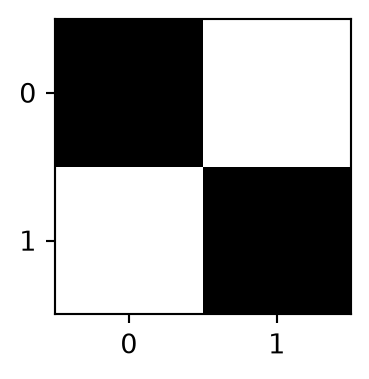
Creating vectors during execution
A vector's length can be chosen when the program runs. The following examples use a local random-number generator so their results can be repeated without resetting the generator used elsewhere in a program.
Listing 17 draws ten integers from 1 through 100, prints them, and then makes every odd value even by adding one. The second printout includes the position of each updated value.
82
15
4
95
36
32
29
18
95
14
0 82
1 16
2 4
3 96
4 36
5 32
6 30
7 18
8 96
9 14
In Listing 18, n_elements determines how many strings are created. Every string starts at the beginning of the sentence; its length is drawn uniformly from 1 through the sentence's length. In a terminal program, replace the assignment n_elements = 5 with n_elements = int(input("Enter the number of elements: ")). Use a nonnegative integer.
def sentence_prefixes(n_elements: int, rng: random.Random) -> list[str]:
    if n_elements < 0:
        raise ValueError("n_elements must be nonnegative")
    sentence = "The quick brown fox jumps over the lazy dog"
    values = [""] * n_elements
    for index in range(n_elements):
        length = rng.randint(1, len(sentence))
        values[index] = sentence[:length]
    return values


n_elements = 5
prefixes = sentence_prefixes(n_elements, random.Random(42))
for prefix in prefixes:
    print(prefix)
The quick brown fox jumps over the lazy d
The quic
Th
The quick brown fo
The quick brown Listing 19 returns a vector of the requested length. Each value is a floating-point number greater than or equal to 0 and less than 1. The two checks request three and five elements.
def array_with_random_values(
    n_elements: int, rng: random.Random
) -> list[float]:
    if n_elements < 0:
        raise ValueError("n_elements must be nonnegative")
    values = [0.0] * n_elements
    for index in range(n_elements):
        values[index] = rng.random()
    return values


random_values = array_with_random_values(3, random.Random(42))
assert len(random_values) == 3
random_values = array_with_random_values(5, random.Random(42))
assert len(random_values) == 5
print(random_values)
[0.6394267984578837, 0.025010755222666936, 0.27502931836911926, 0.22321073814882275, 0.7364712141640124]Element storage and large vectors
A Python list contains references to objects. Its memory usage also depends on the objects and the list's allocated capacity. A typed numerical buffer stores values of one type. The standard-library array module provides such buffers, and itemsize gives the number of bytes per stored element.
Table 4 calculates element storage for six vector lengths when each element occupies 8 bytes. MB uses \(10^6\) bytes; MiB uses \(2^{20}\) bytes. The values describe element storage, excluding container overhead and other process memory.
| Elements | Element storage (MB) | Element storage (MiB) |
|---|---|---|
| 1,000 | 0.008 | 0.007629 |
| 100,000 | 0.8 | 0.762939 |
| 10,000,000 | 80 | 76.293945 |
| 100,000,000 | 800 | 762.939453 |
| 500,000,000 | 4,000 | 3,814.697266 |
| 1,000,000,000 | 8,000 | 7,629.394531 |
Listing 20 checks the element size on the current machine and calculates all six storage requirements. It allocates buffers of 1,000 and 100,000 elements to check their lengths and element-storage sizes. The four larger sizes are calculations, without corresponding allocations. Releasing a reference does not guarantee an immediate decrease in process memory.
from array import array

sizes = [1000, 100000, 10000000, 100000000, 500000000, 1000000000]
item_size = array("d").itemsize
print("Bytes per double element:", item_size)
for size in sizes:
    element_bytes = size * item_size
    print(size, element_bytes / 1_000_000, element_bytes / (2 ** 20))

for size in sizes[:2]:
    buffer = array("d", [0.0]) * size
    assert len(buffer) == size
    assert len(memoryview(buffer).cast("B")) == size * item_size
    print("Allocated elements:", size, "element bytes:", size * item_size)
    del buffer
Bytes per double element: 8
1000 0.008 0.00762939453125
100000 0.8 0.762939453125
10000000 80.0 76.2939453125
100000000 800.0 762.939453125
500000000 4000.0 3814.697265625
1000000000 8000.0 7629.39453125
Allocated elements: 1000 element bytes: 8000
Allocated elements: 100000 element bytes: 800000Creating and extending matrices
Listing 21 creates a matrix with three rows and four columns. Each entry is an integer drawn from 1 through 100. Nested loops print its twelve entries in row order.
def random_matrix(
    n_rows: int, n_columns: int, rng: random.Random
) -> list[list[int]]:
    if n_rows < 0 or n_columns < 0:
        raise ValueError("dimensions must be nonnegative")
    matrix = [[0 for column in range(n_columns)] for row in range(n_rows)]
    for row in range(n_rows):
        for column in range(n_columns):
            matrix[row][column] = rng.randint(1, 100)
    return matrix


random_table = random_matrix(3, 4, random.Random(42))
for row in random_table:
    for value in row:
        print(value)
82
15
4
95
36
32
29
18
95
14
87
95In Listing 22, the three rows contain experiment numbers, objective-function values, and runtimes. The initial four experiments become five after one column is added. Objective values from 1 through 100 and runtimes from 1 through 1,000 are randomly generated example values. The code prints the table before resizing, with an empty added column, and after that column is filled. Each value has a minimum display width of ten characters.
def format_matrix(matrix: list[list[object]], width: int = 10) -> str:
    lines = []
    for values in matrix:
        line = ""
        for value in values:
            text = "" if value is None else str(value)
            line += text.rjust(width)
        lines.append(line)
    return "\n".join(lines)


def experiment_table(rng: random.Random) -> list[list[int | None]]:
    table = [[None for column in range(4)] for row in range(3)]
    for column in range(4):
        table[0][column] = column + 1
        table[1][column] = rng.randint(1, 100)
        table[2][column] = rng.randint(1, 1000)
    return table


def fill_new_experiment(
    table: list[list[int | None]], rng: random.Random
) -> None:
    """Fill the final, newly appended column of a three-row table."""
    column = len(table[0]) - 1
    if any(row[column] is not None for row in table):
        raise ValueError("the added column must be empty")
    table[0][column] = column + 1
    table[1][column] = rng.randint(1, 100)
    table[2][column] = rng.randint(1, 1000)


rng = random.Random(42)
experiments = experiment_table(rng)
before = [row[:] for row in experiments]
print("Before resizing:")
print(format_matrix(experiments))

for row in experiments:
    row.append(None)
print("After resizing:")
print(format_matrix(experiments))

fill_new_experiment(experiments, rng)
print("After adding results:")
print(format_matrix(experiments))
assert [row[:4] for row in experiments] == before
Before resizing:
1 2 3 4
82 4 36 29
115 760 251 143
After resizing:
1 2 3 4
82 4 36 29
115 760 251 143
After adding results:
1 2 3 4 5
82 4 36 29 95
115 760 251 143 105Moving a table between a file and nested lists
CSV files provide a bridge between a spreadsheet table and Python. The file DataStructuresCustomerOrders.csv contains the header and the five customer orders in Table 5. Save it in a data folder next to the script or notebook before running the following examples.
| Customer | Order Date | Order Amount |
|---|---|---|
| C1 | 2021-01-01 | 100 |
| C2 | 2021-01-02 | 200 |
| C3 | 2021-01-03 | 300 |
| C4 | 2021-01-04 | 400 |
| C5 | 2021-01-05 | 500 |
The amount is in the third column. The first file row contains column names; the five following rows contain the data. The CSV reader initially returns all fields as strings. Date and numerical conversions must be explicit.
Listing 23 reads the complete table, then visits each of its five data rows to create a typed matrix. The first entry in each row remains a string, the second becomes a date, and the third becomes a float.
import csv
from datetime import date


def read_csv_table(path: str) -> list[list[str]]:
    with open(path, newline="", encoding="utf-8") as file:
        return list(csv.reader(file))


def customer_orders(table: list[list[str]]) -> list[list[object]]:
    if not table or table[0] != ["Customer", "Order Date", "Order Amount"]:
        raise ValueError("the table must have the customer-order header")
    data = []
    for row in table[1:]:
        if len(row) != 3:
            raise ValueError("each order must have three fields")
        data.append([row[0], date.fromisoformat(row[1]), float(row[2])])
    return data


raw_table = read_csv_table("data/DataStructuresCustomerOrders.csv")
orders = customer_orders(raw_table)
assert orders[0] == ["C1", date(2021, 1, 1), 100.0]
assert orders[4] == ["C5", date(2021, 1, 5), 500.0]
for row in orders:
    print(row)
['C1', datetime.date(2021, 1, 1), 100.0]
['C2', datetime.date(2021, 1, 2), 200.0]
['C3', datetime.date(2021, 1, 3), 300.0]
['C4', datetime.date(2021, 1, 4), 400.0]
['C5', datetime.date(2021, 1, 5), 500.0]Listing 24 shows two ways of selecting a rectangular block: copying each selected field with loops, and copying selected rows with slicing. The corner contains the first two columns of the header and first order. The full data block contains five rows and three columns and excludes the header. All coordinates below are zero-based.
def table_block(
    table: list[list[str]], first_row: int, first_column: int,
    row_count: int, column_count: int,
) -> list[list[str]]:
    if min(first_row, first_column, row_count, column_count) < 0:
        raise ValueError("coordinates and dimensions must be nonnegative")
    if first_row + row_count > len(table):
        raise ValueError("the selected rows must exist")
    block = []
    for row_index in range(first_row, first_row + row_count):
        if first_column + column_count > len(table[row_index]):
            raise ValueError("the selected columns must exist")
        row = []
        for column in range(first_column, first_column + column_count):
            row.append(table[row_index][column])
        block.append(row)
    return block


corner = table_block(raw_table, 0, 0, 2, 2)
assert corner == [["Customer", "Order Date"], ["C1", "2021-01-01"]]

full_data = table_block(raw_table, 1, 0, 5, 3)
bulk_data = [row[:] for row in raw_table[1:6]]
assert full_data == bulk_data

amounts = [float(row[2]) for row in full_data]
assert amounts == [100.0, 200.0, 300.0, 400.0, 500.0]
print(corner)
print(full_data)
print(amounts)
[['Customer', 'Order Date'], ['C1', '2021-01-01']]
[['C1', '2021-01-01', '100'], ['C2', '2021-01-02', '200'], ['C3', '2021-01-03', '300'], ['C4', '2021-01-04', '400'], ['C5', '2021-01-05', '500']]
[100.0, 200.0, 300.0, 400.0, 500.0]Listing 25 writes all six rows, including the header, using two methods. Opening each destination in write mode replaces its previous contents. The CSV writer handles delimiters and quoting, and the readback checks compare every field with the input table. The example writes into a temporary directory that is removed when the with block ends. You can also use CSV exports to save calculated results.
from pathlib import Path
from tempfile import TemporaryDirectory


def write_table_bulk(path: str, table: list[list[str]]) -> None:
    with open(path, "w", newline="", encoding="utf-8") as file:
        csv.writer(file).writerows(table)


def write_table_with_loops(path: str, table: list[list[str]]) -> None:
    with open(path, "w", newline="", encoding="utf-8") as file:
        writer = csv.writer(file)
        for row_index in range(len(table)):
            row = []
            for column in range(len(table[row_index])):
                row.append(table[row_index][column])
            writer.writerow(row)


with TemporaryDirectory() as directory:
    bulk_path = str(Path(directory) / "processed_orders_bulk.csv")
    loop_path = str(Path(directory) / "processed_orders_loops.csv")
    write_table_bulk(bulk_path, raw_table)
    write_table_with_loops(loop_path, raw_table)
    assert read_csv_table(bulk_path) == raw_table
    assert read_csv_table(loop_path) == raw_table
    print("Both written tables match all six rows and three columns.")
Both written tables match all six rows and three columns.